
mcp aims to implement Generalized Linear Models in a way
that closely mimics that of brms::brm. You can set
the family and link functions using the family
argument.
First, let us specify a toy model with three segments:
model = list(
  y | trials(N) ~ 1,  # constant success probability
  ~ 0 + year,  # joined changing success probability
  ~ 1 + year  # disjoined changing success probability
)
Simulate data
If you already have data, you can safely skip this section.
We run mcp with sample = FALSE to get what
we need to simulate data.
library(mcp)
future::plan(future::multisession, workers = 3)

df = data.frame(
  year = 1901:2020,  # evaluate for each of these
  N = sample(10:20, size = 120, replace = TRUE),  # number of trials
  y = 1
)

empty = mcp(model, data = df, family = binomial(), sample = FALSE)
Now we can simulate. First, let us see the model parameters.
mcp_pars(empty)## # A tibble: 6 × 8
## parameter part scope role segment dpar group_col population_parameter
## <chr> <chr> <chr> <chr> <int> <chr> <chr> <chr>
## 1 cp_1 cp population change_point 2 NA NA NA
## 2 cp_2 cp population change_point 3 NA NA NA
## 3 Intercept_1 predictor population coefficient 1 mu NA NA
## 4 year_2 predictor population coefficient 2 mu NA NA
## 5 Intercept_3 predictor population coefficient 3 mu NA NA
## 6 year_3 predictor population coefficient 3 mu NA NA- It takes two intercepts (
Intercept_*), for segments 1 and 3. - It takes two slopes (
year_*), for segment 2 and 3. - It takes two change points (
cp_*) - one between each pair of adjacent segments.
empty$simulate is now a function that can predict data
given these parameters (signature:
empty$simulate(fit, newdata, ...)). If you are in a
reasonable R editor, type empty$simulate( and press TAB to
see the required arguments. I came up with some values below, including
change points at year = 1925 and year = 1975. Because binomial()
defaults to link = "logit", the intercept and slopes are on
the logit scale, which
maps success probabilities between 0 and 1 to the real line. This will
be important later when we set priors.
df$y = empty$simulate(
  empty, df,
  cp_1 = 1925, cp_2 = 1975,
  Intercept_1 = 2, Intercept_3 = -0.5,
  year_2 = -0.1, year_3 = 0.1)

head(df)
## year N y
## 1 1901 10 8
## 2 1902 14 13
## 3 1903 10 8
## 4 1904 18 15
## 5 1905 19 18
## 6 1906 13 13Visually:
plot(df$year, df$y)
Check parameter recovery
The next sections go into more detail, but let us quickly see if we can recover the parameters used to simulate the data.
We can use summary to see that it recovered the
parameters to a pretty good precision. Again, recall that intercepts and
slopes are on a logit scale.
summary(fit)## Family: binomial
## Links: mu = logit
## Draws: 30000 (3 chains with iter = 10000)
## Segments:
## 1: y | trials(N) ~ 1
## 2: ~ 0 + year
## 3: ~ 1 + year
##
## Change point parameters:
## parameter mean sd lower upper rhat ess_bulk ess_tail sim match
## cp_1 1921.5 2.8 1915.6 1926.8 1.00 3888 6842 1925.0 OK
## cp_2 1974.27 0.81 1972.19 1974.98 1.00 3462 1549 1975.00 OK
##
## Population-level parameters:
## parameter mean sd lower upper rhat ess_bulk ess_tail sim match
## Intercept_1 2.18 0.19 1.84 2.58 1.00 4564 7680 2.00 OK
## year_2 -0.0928 0.0067 -0.1065 -0.0803 1.00 7275 11366 -0.1000 OK
## Intercept_3 -0.76 0.23 -1.26 -0.36 1.00 1665 1643 -0.50 OK
## year_3 0.110 0.010 0.091 0.131 1.01 1125 2155 0.100 OKsummary uses 95% central posterior intervals by default,
but you can change it using summary(fit, width = 0.80). If
you have group-level
effects, use ranef(fit) to see their deviations.
Plotting the fit confirms good fit to the data, and we see the discontinuities at the two change points:
plot(fit)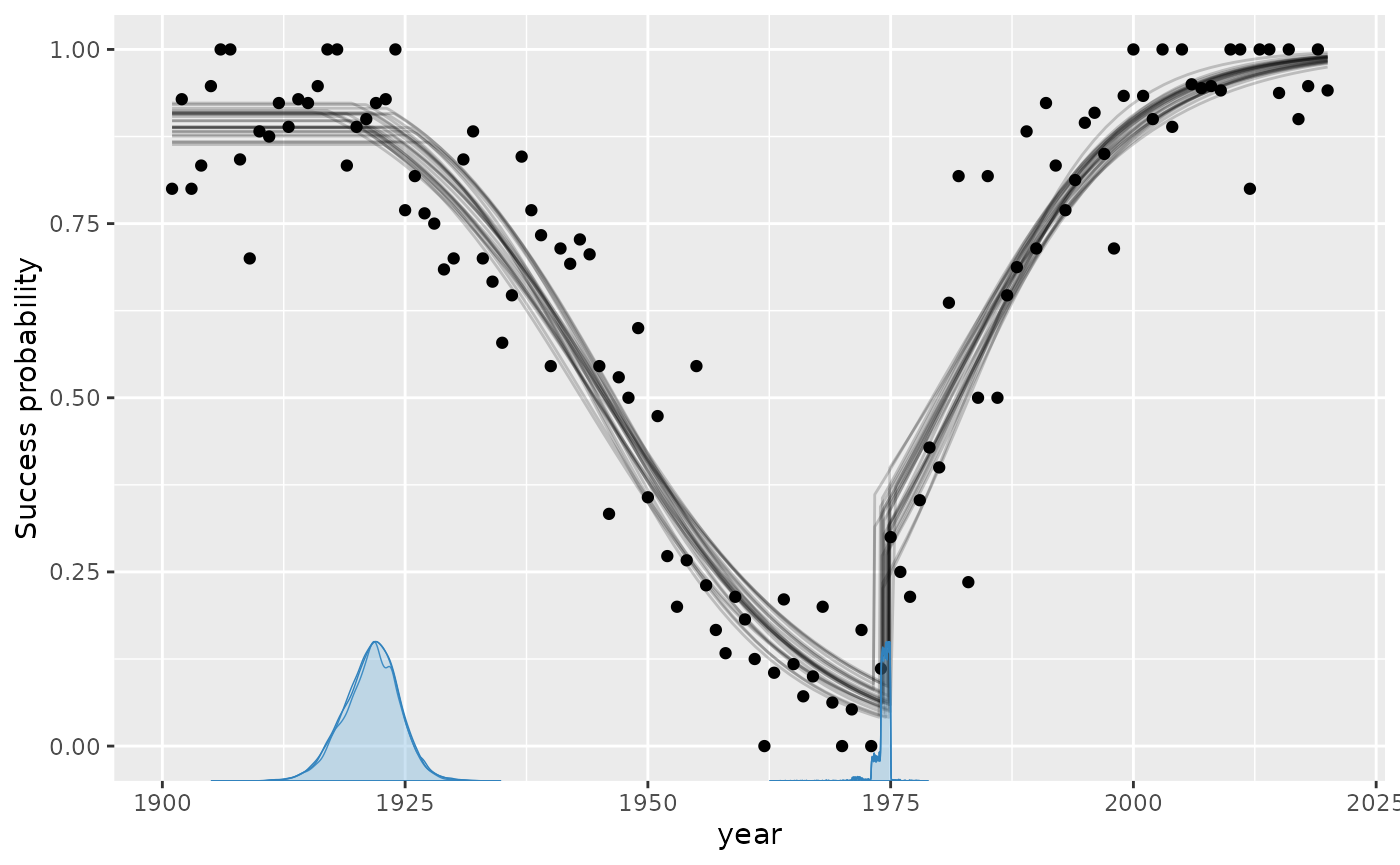
These lines are just fit$simulate applied to random
posterior draws. In other words, they represent the joint distribution
of the parameters. You can change the number of draws (lines) using
plot(fit, lines = 50).
Speaking of alternative visualizations, you can also plot this on the logit scale, where the linear trends are modeled:
plot_dpar(fit, scale = "linear")## Not showing 17 data point(s) with infinite values on the linear scale.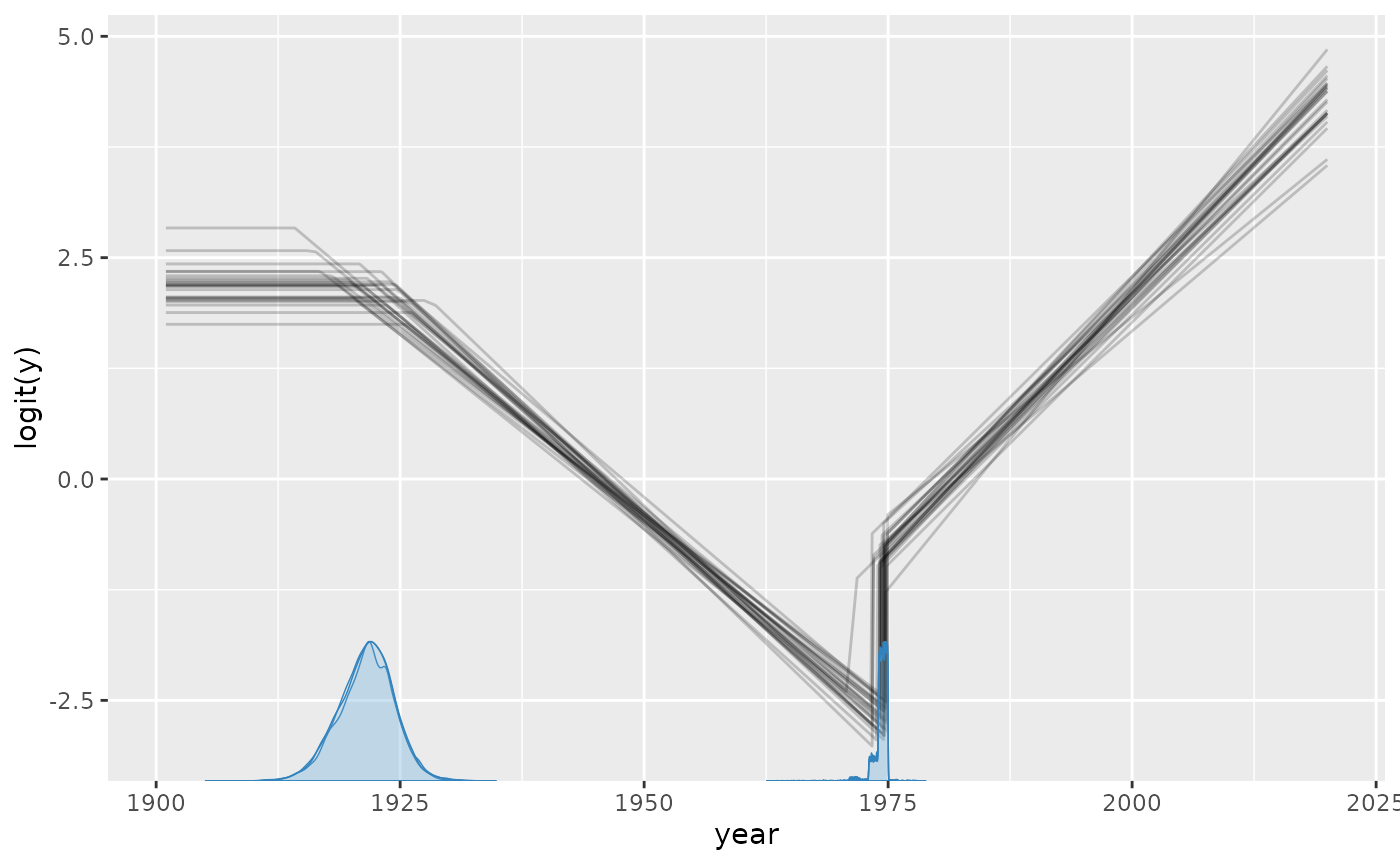
Data points with zero or all successes (y = 0 or
y = N) are at \pm\infty on
the logit scale, so they are not shown, as the message says.
These plots work with group-level effects as well.
Model diagnostics and sampling options
Already in the default plot as used above, it will be
obvious if there was poor convergence. A more direct assessment is to
look at the posterior distributions and trace plots:
plot_pars(fit, npars = NULL)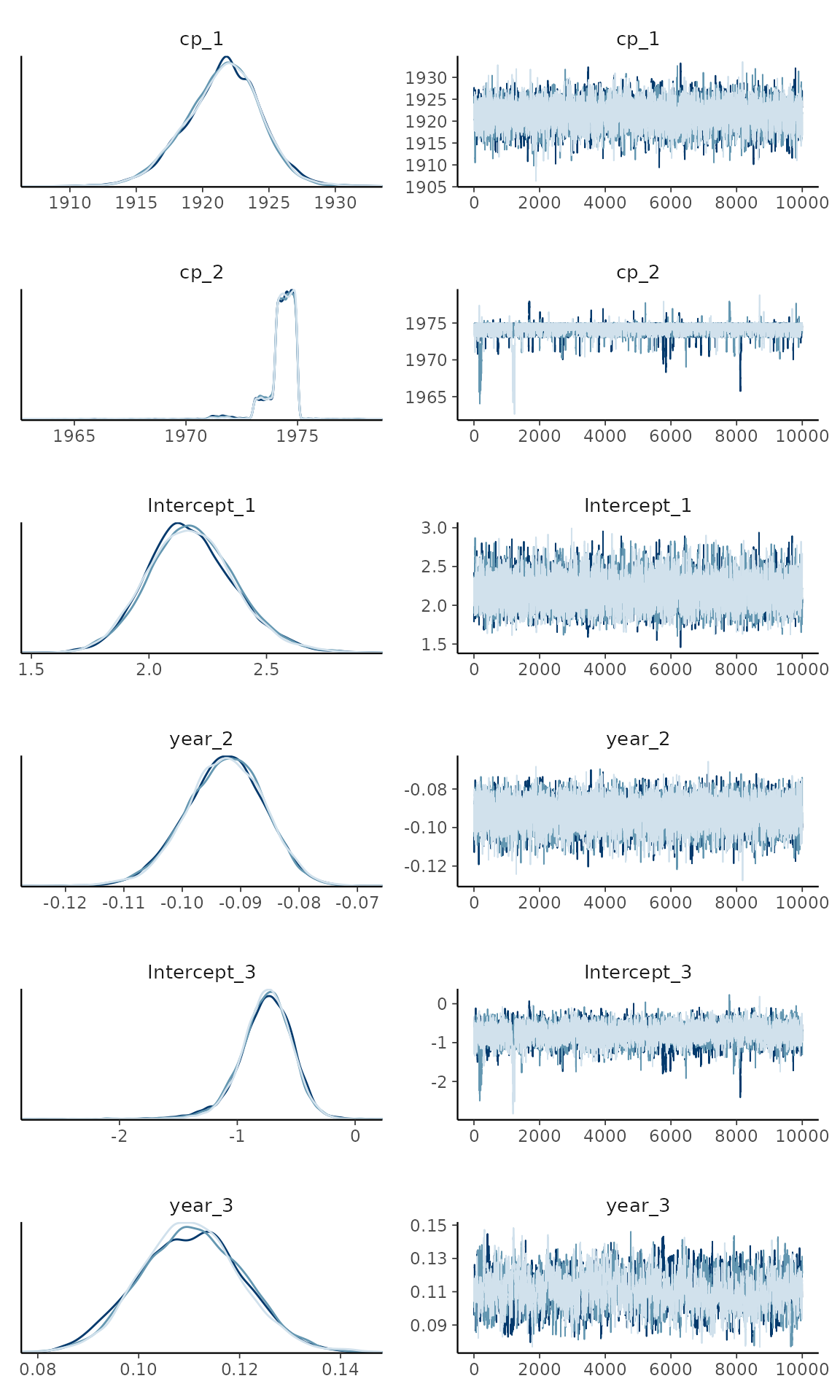
Convergence looks good here as evidenced by the overlapping trace plots that look like fat caterpillars (Bayesians love fat caterpillars). Notice that the posterior distribution of change points can be quite non-normal and sometimes even bimodal. Therefore, one should be careful not to interpret the interval as if it was normal.
plot() and plot_pars() can do a lot more
than this, so check out the plotting
article.
Priors for binomial models
Brief overview of all default priors
mcp uses priors to achieve a lot of its functionality.
See how to set priors, including
how to fix values. Here, I post a few notes about the binomial-specific
default priors.
All priors are stored in fit$prior (also
empty$prior). We did not specify prior above,
so it ran with the default
priors:
cbind(fit$prior)  # Raw view
prior_summary(fit)  # Richer view. Try adding verbose = TRUE
## [,1]
## cp_1 "dunif(min(year), max(year))"
## cp_2 "dunif(min(year), max(year))"
## Intercept_1 "dnorm(0, 1.5)"
## year_2 "dnorm(0, 0.043121968093205169)"
## Intercept_3 "dnorm(0, 1.5)"
## year_3 "dnorm(0, 0.043121968093205169)"
## # A tibble: 6 × 5
## parameter segment dpar prior bounds
## <chr> <int> <chr> <chr> <chr>
## 1 cp_1 2 NA dunif(1901, 2020) [1901, 2020], ordered
## 2 cp_2 3 NA dunif(1901, 2020) [1901, 2020], ordered
## 3 Intercept_1 1 mu dnorm(0, 1.5) none
## 4 year_2 2 mu dnorm(0, 0.043122) none
## 5 Intercept_3 3 mu dnorm(0, 1.5) none
## 6 year_3 3 mu dnorm(0, 0.043122) noneThe priors on change points are discussed extensively in the prior article. With the
default logit link, intercepts use dnorm(0, 1.5), which is
approximately uniform on the probability scale: its central 95% interval
is approximately -2.9 to 2.9 logits, corresponding to probabilities from
0.05 to 0.95. The probit link uses dnorm(0, 1), which is
exactly uniform on the probability scale. The figure compares normal
priors with SD 1.5 (black, the mcp default) and 2.5 (blue,
the rstanarm default), together with their correspondence
to probabilities.
inverse_logit = function(x) exp(x) / (1 + exp(x))

# Start the plot
library(ggplot2)
ggplot(data.frame(logits = 0), aes(x = logits)) +

  # Plot normal priors. Set SD in "args"
  stat_function(fun = dnorm, args = list(sd = 1.5), lwd = 2, col = "black") +
  stat_function(fun = dnorm, args = list(sd = 2.5), lwd = 2, col = "blue") +

  # Set the secondary axis
  scale_x_continuous(
    breaks = -7:7, limits = c(-7, 7),
    sec.axis = sec_axis(
      ~ inverse_logit(.),
      name = "Probability",
      labels = scales::percent_format(),
      breaks = round(inverse_logit(seq(-7, 7, by = 2)), 3)
    )
  )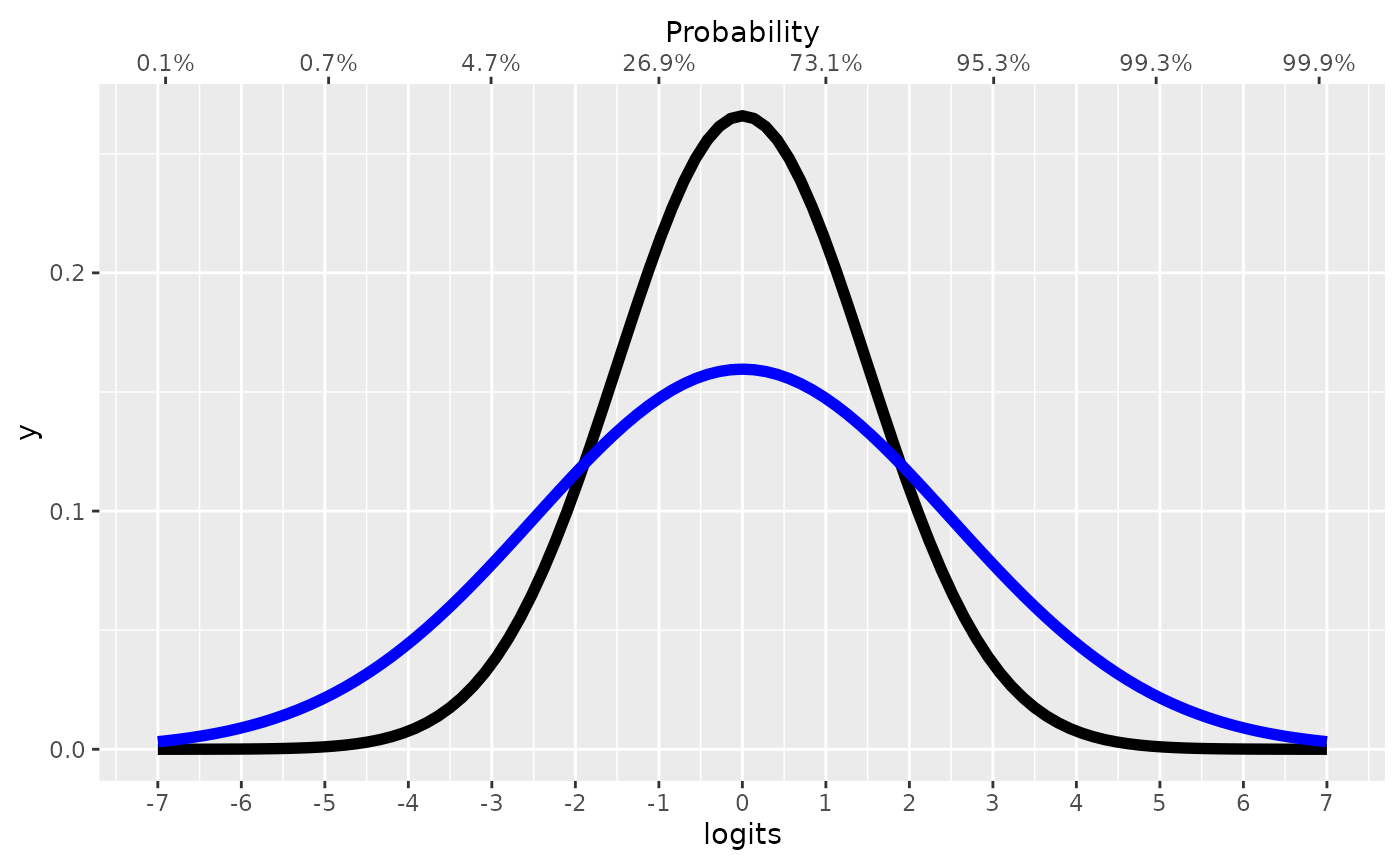
Please keep in mind that when these priors combine through the model, the joint probability may be quite different.
Coefficients and categorical contrasts use the same scales, autoscaled
as in rstanarm: dnorm(0, 1.5 / sd(column))
for logit links and dnorm(0, 1 / sd(column)) for probit
links.
JAGS code
Here is the JAGS code for the model used in this article.
fit$jags_code## model {
## # Change points
## cp_0 = min(year)
## cp_1 ~ dunif(cp_0, cp_3) # Flat Dirichlet on the segment lengths
## cp_2 ~ dunif(cp_0, cp_3) # Flat Dirichlet on the segment lengths
## cp_3 = max(year)
## cp_order_ ~ dbern(step(cp_2 - cp_1)) # Ordered change points
##
## # Priors for population-level effects
## Intercept_1 ~ dnorm(0, 1/(1.5)^2) # Link-scale intercept, approximately uniform on the probability scale
## year_2_end_ ~ dnorm(Intercept_1, 1/(0.043121968093205169*(cp_2-cp_1))^2) # Autoscaled link-scale coefficient (rstanarm autoscaling); sampled as the value at the segment end
## year_2 = (year_2_end_ - (Intercept_1)) / (cp_2 - cp_1)
## Intercept_3_end_ ~ dnorm(year_3 * (cp_3 - cp_2), 1/(1.5)^2) # Link-scale intercept, approximately uniform on the probability scale; sampled as the value at the segment end
## Intercept_3 = Intercept_3_end_ - (year_3 * (cp_3 - cp_2))
## year_3 ~ dnorm(0, 1/(0.043121968093205169)^2) # Autoscaled link-scale coefficient (rstanarm autoscaling)
##
## # Model and likelihood
## for (i_ in 1:length(year)) {
## # year measured from each segment's change point
## x_local_1_[i_] = min(year[i_], cp_1)
## x_local_2_[i_] = min(year[i_], cp_2) - cp_1
## x_local_3_[i_] = min(year[i_], cp_3) - cp_2
##
## # Formula for mu
## link_mu_[i_] =
## (year[i_] >= cp_0) * (year[i_] < cp_2) * inprod(rhs_matrix_[i_, c(1)], c(Intercept_1)) * 1 +
## (year[i_] >= cp_1) * (year[i_] < cp_2) * inprod(rhs_matrix_[i_, c(2)], c(year_2)) * x_local_2_[i_] +
## (year[i_] >= cp_2) * inprod(rhs_matrix_[i_, c(3)], c(Intercept_3)) * 1 +
## (year[i_] >= cp_2) * inprod(rhs_matrix_[i_, c(4)], c(year_3)) * x_local_3_[i_]
##
## # Likelihood for family = binomial()
## mu_[i_] = ilogit(link_mu_[i_])
## y[i_] ~ dbin(mu_[i_], N[i_])
## }
## }