
This article introduces predict(),
fitted(), residuals() for in-sample and
out-of-sample data. I will also show how to get creative with
mcp, including how to make predictions around future change
points.
Preparation: an example model
We need an mcpfit to get started. We take the “demo”
dataset:
library(mcp)
future::plan(future::multisession, workers = 3)

data = mcp_example_data("demo")
head(data)
## response time
## 1 12.235516 76.33986
## 2 6.351706 83.51711
## 3 28.049953 60.18529
## 4 15.681983 74.72964
## 5 16.213643 85.88256
## 6 22.322824 40.05069… and model it as three segments, i.e., two change points:
# Define the model
model = list(
  response ~ 1,  # plateau (Intercept_1)
  ~ 0 + time,    # joined slope (time_2) at cp_1
  ~ 1 + time     # disjoined slope (Intercept_3, time_3) at cp_2
)

# Fit it
fit = mcp(model, data = data)
This is what the data and inferred fit look like with 80% central intervals for the expected response and for the posterior predictive:
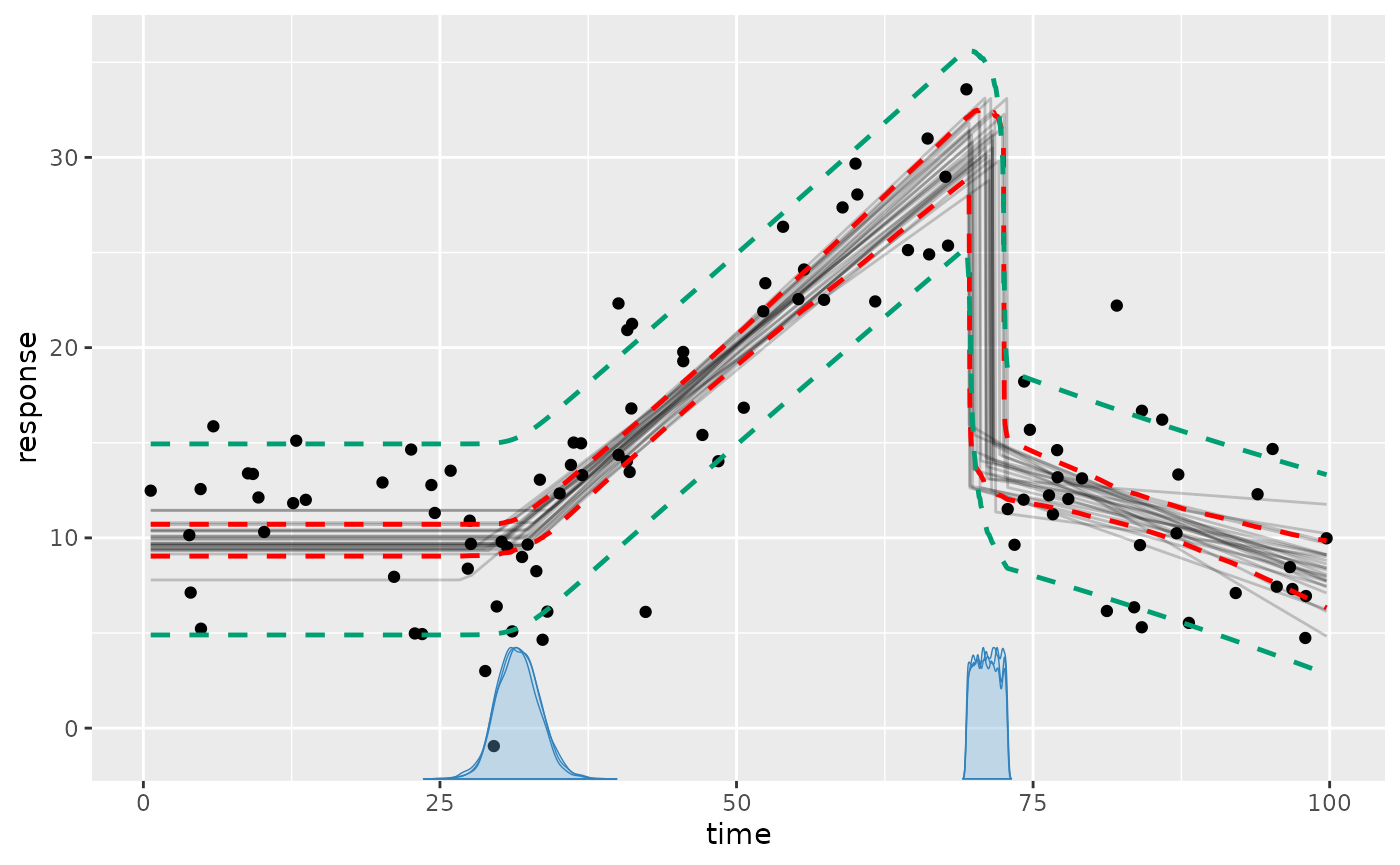
To review what we see here:
- The black dots are the data from
data. - The gray lines are 25 posterior draws (control using
plot(fit, lines = 100)). - The dashed red lines are the 10% and 90% quantiles of the fitted (expected) values.
- The green lines are the 10% and 90% quantiles of the predicted values.
- The blue curves on the x-axis are the posterior distributions of the
change point locations (better viewed using
plot_pars(fit, pars = c("cp_1", "cp_2"))).
Behind the scenes, plot() merely calls
predict() and fitted() to show these
inferences.
Extracting fitted() values
To get the fitted values for each data point, simply do
fitted(fit):
## # A tibble: 6 × 6
##   response  time .mean   .sd .lower .upper
##      <dbl> <dbl> <dbl> <dbl>  <dbl>  <dbl>
## 1    12.2   76.3  12.9 0.991  10.9    14.8
## 2     6.35  83.5  11.4 0.711  10.0    12.8
## 3    28.0   60.2  25.4 0.886  23.7    27.2
## 4    15.7   74.7  13.2 1.09   11.1    15.3
## 5    16.2   85.9  10.9 0.703   9.59   12.3
## 6    22.3   40.1  14.5 0.647  13.1    15.7
In general, this output contains:
A column for each predictor column in the data. Here,
timeis the only predictor and you see the values in the same order as indata(which is copied tofit$data). Models with group-level effects additionally have the relevant grouping columns,binomial()models have the number of trials, etc..mean: The fitted value (posterior mean). When
summary = FALSE, you instead get one row per draw with the value in.epred, matchingtidybayes::add_epred_draws()conventions..sd: The posterior standard deviation of the expected response. In
predict()output,.sdis instead the posterior predictive standard deviation..lower and .upper: The lower and upper ends of the central interval. It is 95% by default, but you can set it using, e.g.,
fitted(fit, width = 0.8). Usesummary = FALSEto compute other quantiles from the draws.
The columns computed by mcp are prefixed with a dot, so
they never collide with columns in your data.
If you compare these values to the plot, you will see that they
correspond. plot() merely calls fitted()
behind the scenes.
Expected responses for out-of-sample data
To predict out-of-sample data, you can simply use the
newdata argument.
newdata = data.frame(time = c(data$time[1], 25, -20, 200))
fitted(fit, newdata = newdata)
## # A tibble: 4 × 5
## time .mean .sd .lower .upper
## <dbl> <dbl> <dbl> <dbl> <dbl>
## 1 76.3 12.9 0.991 10.9 14.8
## 2 25 9.93 0.659 8.65 11.2
## 3 -20 9.93 0.659 8.65 11.2
## 4 200 -12.1 9.29 -30.4 6.01Note that:
- We get one row per value of
time. - The first value for
timeis in the dataset. The values correspond to the same row infitted(fit)because that’s merely a shortcut to dofitted(fit, newdata = fit$data). - The second value (
time = 25) is within the observed region, but not in the dataset. - The third value (
time = -20) is outside the observed region, butmcpmerely extends the first segment backwards in time. Because it’s a plateau, we see approximately the same values as fortime = 25. - The fourth value (
time = 200) is way outside the observed region. Because it is the extrapolation of the slope in the third segment of which we’ve only observed the first tiny bit, the posterior distribution is very wide because even a small uncertainty in the slope results in very large differences further out.
Arguments
If you look at the documentation for predict(),
fitted(), and residuals(), you’ll see that
they are quite versatile, taking many different arguments. To mention a
few, you can set fitted(fit, dpar = "sigma") to get fitted
values for sigma (more on
modeling sigma), prior = TRUE to predict using only the
prior, and arma = FALSE to exclude AR/MA effects. For
group-level effects, use group_effects = TRUE (all),
FALSE or NA (none), "cp" or
"predictor" (a formula part), or group-level parameter
names with optional * wildcards, e.g.,
"cp_*".
Predictions
predict() draws from the posterior predictive
distribution and takes almost the same arguments as
fitted(). This supports predictions for in-sample and
out-of-sample data. plot() uses predict()
under the hood for posterior predictive intervals. The values below
correspond to the dashed green lines in the plot (the 80% posterior
predictive interval):
## # A tibble: 6 × 6
##   response  time .mean   .sd .lower .upper
##      <dbl> <dbl> <dbl> <dbl>  <dbl>  <dbl>
## 1    12.2   76.3  12.9  4.00   7.76   18.0
## 2     6.35  83.5  11.4  3.94   6.39   16.5
## 3    28.0   60.2  25.4  3.97  20.4    30.5
## 4    15.7   74.7  13.2  4.02   8.05   18.3
## 5    16.2   85.9  10.9  3.94   5.92   16.0
## 6    22.3   40.1  14.5  3.93   9.46   19.5
Note that predict() uses random sampling under the hood,
so these values will differ slightly from call to call. You can make it
replicable using set.seed() as above. In general, the more
posterior draws, the less the call-to-call variance will be. Conversely,
fewer draws means more call-to-call variation, e.g., if you do
predict(fit, ndraws = 10). The interval
(.lower and .upper) is the exception: It is
computed exactly from the posterior predictive distribution, so it is
deterministic for a given set of posterior draws.
To get custom quantiles, get the draws using
summary = FALSE and summarise them yourself. These
quantiles are computed from simulated responses, so they are subject to
the call-to-call variation described above:
predict(fit, summary = FALSE) |>
  dplyr::group_by(.row, time) |>  # Group by original data row. Keep time as column in reframe().
  dplyr::reframe(quantile = c(0.1, 0.5, 0.9), .prediction = quantile(.prediction, quantile)) |>
  head()
## # A tibble: 6 × 4
## .row time quantile .prediction
## <int> <dbl> <dbl> <dbl>
## 1 1 76.3 0.1 7.80
## 2 1 76.3 0.5 12.9
## 3 1 76.3 0.9 18.0
## 4 2 83.5 0.1 6.47
## 5 2 83.5 0.5 11.4
## 6 2 83.5 0.9 16.5See the plotting article for
adding custom quantiles to plot().
Residuals
residuals() is simply
data$response - fitted(). It may be useful for model
checking, but the typical needs are covered using posterior predictive
checking (pp_check(fit)) and visual inspection of
plot(fit, interval = c("fitted", "predict")).
Forecasting with future change points
Bayesian inference is the principled updating of prior knowledge
using data. Where there is little or no data, the prior speaks louder.
Sometimes, we can learn surprising stuff simply by inspecting the prior
predictive, e.g., how the priors combine when “put through” the model.
In mcp, most functions come with a
prior = FALSE default, but you can simply do
plot(fit, prior = TRUE),
fitted(fit, prior = TRUE), or
predict(fit, prior = TRUE).
Say you want to forecast at time = 125 and you know that
a change point to the baseline level (an intercept change to
Intercept_1) will occur approximately after the same
interval as between cp_1 and cp_2 (i.e., at
cp_2 + (cp_2 - cp_1)). We can model this by adding the
future segment to the model and putting an informative prior on its
change point.
Step 1: add the unobserved segment(s) and fit
First, we extend the model with the future segment of which we have prior knowledge:
Then we set a prior on the new change point cp_3.
mcp uses change point bounds that you set unchanged, also
beyond the data (without bounds, it uses the observed range of
time), so T(max(time), 170) places
cp_3 after the last observation and before the end of our
forecasting horizon at time = 170. All other parameters
keep their default priors. It may be helpful to review priors on change points.
prior_forecast = list(
  cp_3 = "dnorm(cp_2 + (cp_2 - cp_1), 20) T(max(time), 170)"  # In the future at the same interval
)
Now let’s fit it.
old = options(mcp_reparam = FALSE)
fit_forecast = mcp(model_forecast, data = data, prior = prior_forecast)
options(old)
Side note on the options() step: We turned off
mcp reparameterization which usually increases ESS/s but in
this case lowers it. One of the reparam tricks sets the intercept of a
disjoined segment as the value at the end of that segment (read
more). Here, segment 3 ends at the future cp_3, far
from the data, so this sampling trick causes poor mixing.
Step 2: predict!
We can now compute the 80% posterior predictive interval at
time = 125:
predict(fit_forecast, newdata = data.frame(time = 125), width = 0.8)## # A tibble: 1 × 5
## time .mean .sd .lower .upper
## <dbl> <dbl> <dbl> <dbl> <dbl>
## 1 125 7.64 5.48 0.0925 14.1To really understand what’s going on here, it may be helpful to
visualize the model. plot() shows only the observed range
of time, so we make the plot ourselves:
# Get expected-response and posterior predictive draws
newdata = data.frame(time = 1:170)
fitted_forecast = fitted(fit_forecast, newdata = newdata, summary = FALSE, ndraws = 50)
predict_forecast = predict(fit_forecast, newdata = newdata, summary = FALSE)

# Plot it
library(ggplot2)
library(tidybayes)  # Optional package for summarizing and plotting draws
ggplot(predict_forecast, aes(x = time, y = .prediction)) +
  # Posterior predictive intervals and line at x = 125
  stat_summary(fun.data = median_qi, fun.args = list(.width = 0.8), geom = "ribbon", alpha = 0.2) +
  stat_summary(fun.data = median_qi, fun.args = list(.width = 0.5), geom = "ribbon", alpha = 0.3) +
  geom_vline(xintercept = 125, lty = 2, lwd = 1) +

  # Lines for fitted draws
  geom_line(aes(y = .epred, group = .draw), data = fitted_forecast, alpha = 0.2) +

  # Observed data
  geom_point(aes(x = time, y = response), data = data) +
  labs(title = "Predicting with future change points")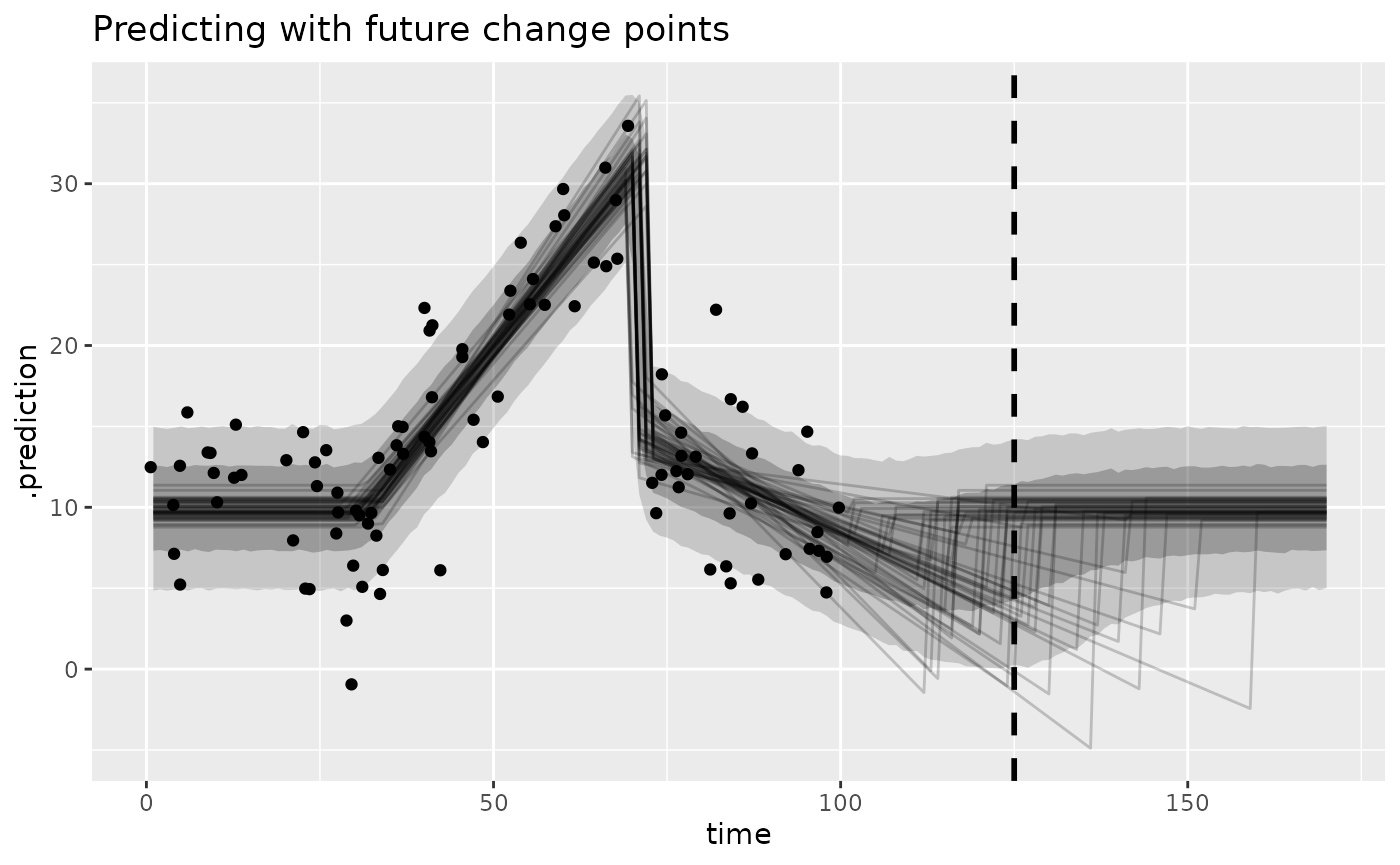
You can read the predicted values from above at x = 125
off this graph. We literally just predicted for all values between 1 and
170, and visualized it using a ribbon. This means that you can also
predict further into the future, if you’d like.
You can extend this approach to an arbitrary number of future segments, even using the posterior from the “unobserved” segment 4 in the priors for parameters in future segments. In Bayesian inference, it really does not make much of a difference whether credence in some parameter values has been updated using data or not - it’s all credence.
Without doing this formal model of the future change point, one may
have thought that the change point should occur around
time = 110 since that’s the expected value of
cp_2 + (cp_2 - cp_1). However, we set the lower bound of
the prior on the future change point (cp_3) to the last
data point (max(time)), so that it occurs after
it, i.e., at time > 100. This is knowledge that the
third change point had not yet been observed at time = 100,
and this pushes the distribution further into the future (actually
around 120; see summary(fit_forecast)).